


Your savings, ready when you are.
StatBox
Voucher Center
See the vouchers you can use now, review what you've already used, and unlock new offers. At checkout, StatBox automatically selects the eligible voucher that saves you the most.
No code comparison needed. You can still change the selected voucher at checkout.
0Ready to use
—Best saving
0Expiring soon
0Already used
All StatBox vouchers
Save with what you have.
Discover what’s next.
See the vouchers you can use now, check past vouchers, or discover new offers to save on StatBox charts and reports. There’s no limit on how many you collect.
StatBox Gift Card Studio
Give someone StatBox credit — wrapped in a chart.
Choose an amount, turn a chart from the StatBox library into the artwork, and send the gift directly or keep it to share yourself. The recipient can use the credit toward eligible StatBox charts and reports.
Gift card = payment credit · not a discount voucher
Spend vouchers
Charts and reports,
with your discount already in
Prices below show what you’d pay right now with the vouchers in your wallet. Collect more and watch them drop.





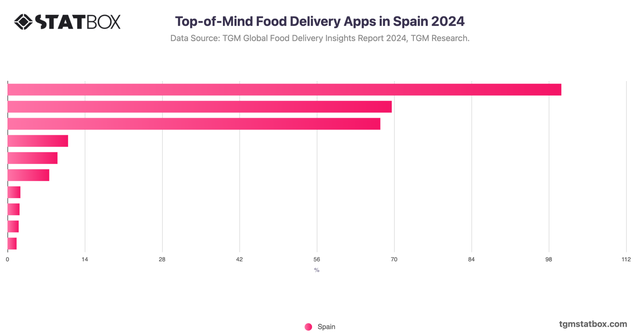
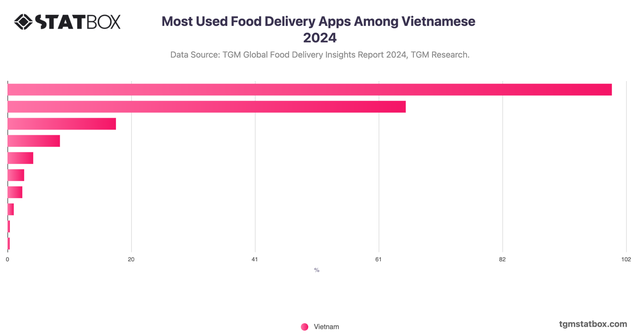
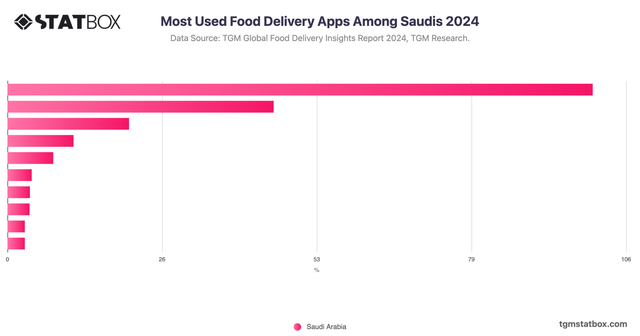
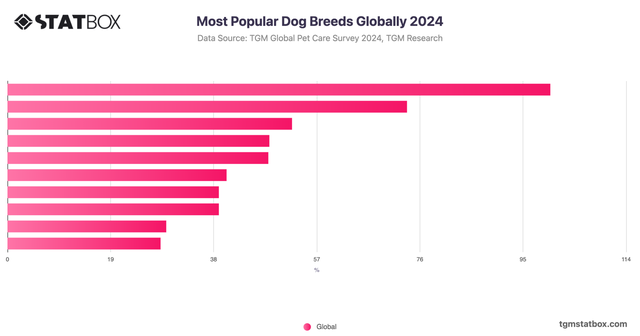
How to apply vouchers
How vouchers work
01
Claim or unlock
Instant offers go straight into My Vouchers. Special rates may ask for a quick eligibility check or activity.
02
Shop normally
Use the voucher card to jump to eligible charts or reports, or simply continue browsing the StatBox library as usual.
03
Get your best price
At checkout, we select the eligible voucher that saves you the most. You can switch it if you'd rather save another voucher for later.
About StatBox vouchers
The rules worth knowing
One discount voucher per order
Discount vouchers do not stack with one another. At checkout, StatBox recommends the eligible voucher with the highest saving for the current order. Unused vouchers remain in your account until they expire or are used.
You can change the recommended voucher
If several vouchers are eligible, choose “Change voucher” at checkout to use a different one. This is useful when you want to save a high-value voucher for a larger future purchase.
Some offers have eligibility or minimum-spend rules
Academic rates require an eligible academic email. Basket vouchers apply only once the order reaches the stated minimum. Each voucher card shows its scope, requirement, and expiry before you claim or use it.
Community vouchers can improve during the season
Joining locks in the current community rate. If the shared unlock reaches a higher tier before the Field Season closes, your unused voucher updates automatically to the higher rate.